10 / 15ToolsPoint Cloud Processing / Automation / Parametric Design2021
Point Cloud Floor Plan Extraction
Floor plans pulled out of a building scan with a slider running from true as-built fidelity through to perfectly orthogonal geometry. Commercial scan-to-BIM tools make that decision for you at the point of extraction. This one leaves it as an input.
RhinoGrasshopper
Computational designComplete
- Organisation
- Role
- Year
- Kind
- Sector
- Status
- WK
- DAY
- HR
- MIN
- SEC
Hours to days to Minutes
Background
Commercial scan-to-BIM tools like Leica CloudWorx or Autodesk ReCap either produce raw traced linework or apply fixed AI-based extraction rules. Either way, the user has little control over how faithful the output is to the as-built condition versus how clean it is.
What I built
A multi-stage parametric process generating 2D floor plan linework from a point cloud scan. Users control section height and point cloud decimation to manage detail. Points are separated and grouped by their surface normal vectors, with an adjustable strength parameter controlling how aggressively similar vectors cluster, and 2D lines are built from the grouped points.
How it works
An angle-snapping parameter optionally corrects near-orthogonal walls to exact 90 or 45 degree angles. A wall sitting at 87 degrees can be snapped to 90. Because that parameter is continuous, the user has a slider running from true as-built fidelity through to idealised design geometry, and can choose where on it a particular deliverable should sit.
Outcome
That level of parametric control over the extraction is unusual. Most tools make the fidelity decision for you at the point of extraction rather than exposing it as an adjustable input.
Technical reference
Developed as research and development work at Aurecon in Wellington, alongside reality capture and existing conditions modelling, and tested on registered terrestrial scan data for the basement and first floor of a commercial building. The extracted plan was used on that project.
What follows is the working documentation: the processing sequence, how the plane detection actually works, every parameter, and an honest account of what the output is not.
The processing sequence
Point cloud handling comes from Cockroach, an open source point cloud plugin for Rhino and Grasshopper developed at ETH Zurich, which supplies import, filtering, downsampling, normal estimation and the RANSAC shape detection. The definition wraps those operations in a sequence tuned for building interiors and adds the geometry cleanup that turns detected planes into drawable lines.
| Stage | What happens |
|---|---|
| Import and reduce | The registered cloud is referenced into Rhino and reduced to a working density. |
| Slice | A horizontal band is taken over a specified Z range at the chosen level. |
| Detect | RANSAC plane detection runs across the slice, grouping points by normal to separate faces, returning planar segments with their supporting points. |
| Filter | Planes are filtered by verticality, extent and supporting point count, so only wall candidates survive. |
| Fit and regularise | Each surviving plane is reduced to a 2D line in plan. Near-parallel and near-collinear lines are aligned and merged. |
| Resolve | Lines are extended and trimmed to their intersections, closing corners into a connected wall network. |
| Export | Curves bake to Rhino layers and export to DWG in the original survey coordinate system. |
Inputs
A registered point cloud, as E57 or PTS. E57 is preferred where available because it carries scanner position, structure and intensity, with PTS accepted as a flat ASCII fallback since that is what a reality capture export path produces. The cloud must already be registered: this does not perform registration.
A slice level, being the Z height at which the plan is cut, given in the coordinate system of the incoming cloud. This is where the operator selects the level or section of the building to extract.
Optionally, a reference building axis as a curve or pair of points, used to drive orthogonal regularisation where the building is not aligned to the world axes.
Why reduction matters first
Raw terrestrial scan data for a single building level runs to hundreds of millions of points, with file sizes in the hundreds of megabytes. Nothing downstream needs the full cloud, and every operation after this is bounded by how many points survive it, which makes reduction the first and most consequential step.
Reduction is applied at a target point spacing rather than a target point count, so density stays uniform across the model and the tolerances used later mean the same thing everywhere. That is the difference between a tolerance that behaves predictably and one that quietly changes meaning between a densely scanned corridor and a sparsely scanned room.
The slice
The band is taken as a straight Z range and the points inside it averaged, so the depth of the range is itself a control. A very thin range gives an accurate cut through the wall at that exact height. A thicker range averages over more surface, smoothing noise and filling short vertical gaps, at the cost of blending anything that changes across the height of the band.
The band has to sit clear of the floor slab and ceiling and avoid any continuous run of furniture or services, so the points inside it belong to wall surface rather than clutter. Where the slab is not level or the scan spans a split level, the band can be cut in more than one pass and the results combined.
RANSAC plane detection
RANSAC fits a plane to a random sample of points, keeps the candidate the most remaining points agree with, removes those points from the pool and repeats until nothing left reaches the minimum support threshold.
Points are grouped and processed using their estimated normal values, and that is what lets detection separate one face from another. Points on a single flat wall share a consistent normal direction, so they cluster and fit as one plane, while points on a wall running in a different direction carry a different normal and form a separate group. Without that normal-based grouping, two walls meeting at a corner would merge into one ambiguous surface.
This is why the method suits scan data specifically. A building interior slice is mostly wall surface with a substantial minority of points belonging to nothing useful: reflections, people, cabling, edge noise and registration scatter. RANSAC does not need those removed first. They fail to join any consensus set and are discarded by the process itself.
Cylinders and spheres are available as primitives in the same Cockroach component and are useful for columns and pipework. The floor plan workflow uses planes only.
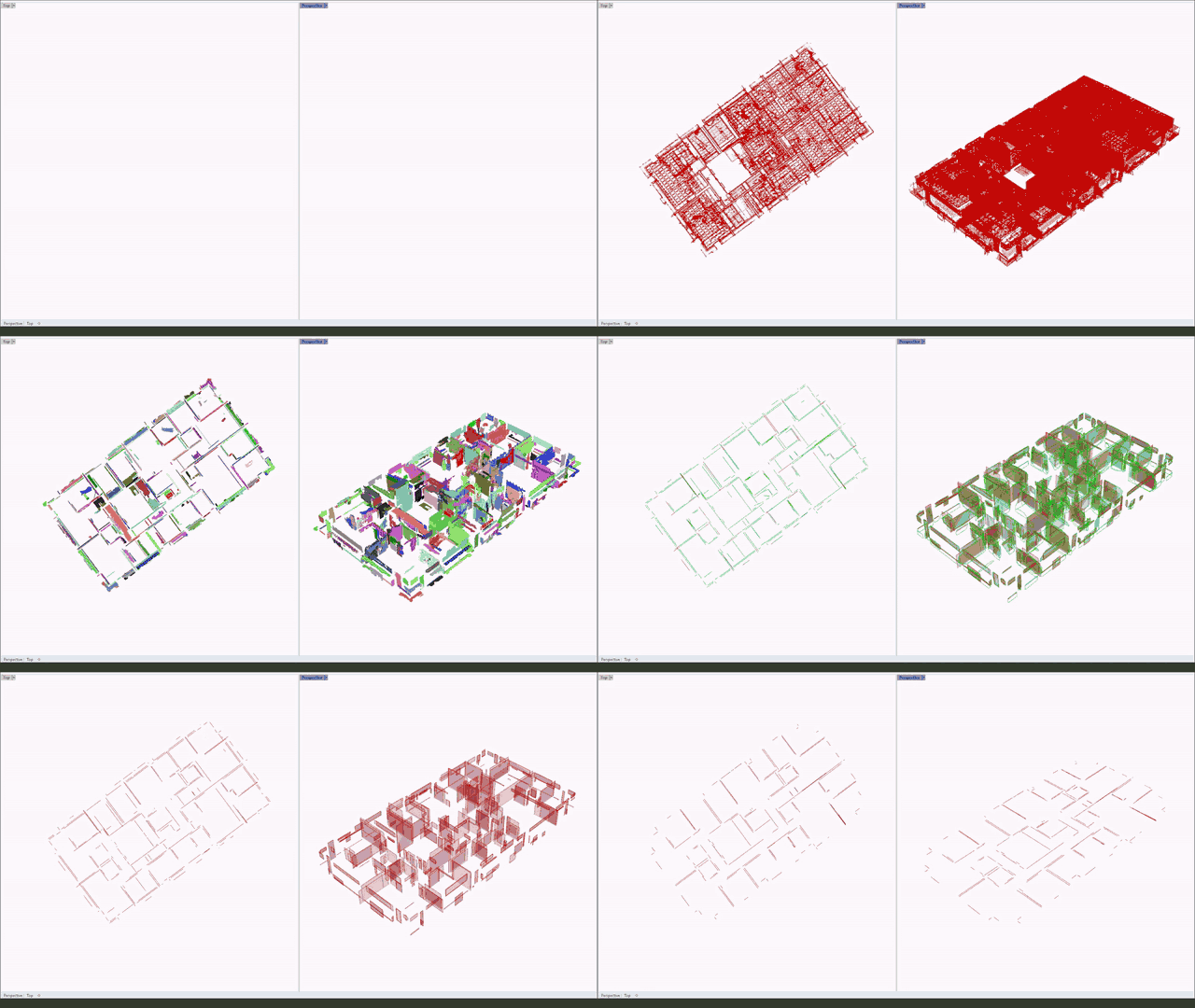
Filtering to wall candidates
Not every detected plane is a wall. Three criteria filter the set: verticality, where the plane normal must lie within a tolerance of horizontal, removing residual floor, ceiling and soffit fragments; extent, where planes shorter than a minimum plan length are discarded, removing fittings, door furniture and small artefacts; and support, where planes below a minimum supporting point count are discarded, removing planes fitted to noise.
The three interact, which is the part worth knowing. Raising the minimum extent to clear out clutter will also start removing genuine short returns around door reveals and service risers, so they are tuned together against a known part of the building rather than in isolation.
Regularisation and corners
After fitting, the drawing is geometrically correct but visually rough. Every line carries the small angular error of the surface it was fitted to, so walls built parallel are drawn a fraction of a degree apart, and a single wall scanned from two positions can appear as two slightly offset lines.
Regularisation resolves this in two passes. Lines whose directions fall within an angular tolerance are snapped to a common direction, typically the dominant building axis and its perpendicular. Lines that are then parallel and within a lateral distance tolerance are merged into one. The result reads as a drawn plan rather than a fitted one. The approach follows the regular arrangements of planes work from University College London, which formalises recovery of the parallel, orthogonal and repeated relationships present in a built structure but lost in fitted output.
Fitted lines stop where the scan data stops, which is short of every corner, because a scanner cannot see into the intersection of two walls. Lines are extended to their nearest intersections and trimmed, closing corners into a connected network rather than a set of loose fragments.
Parameters
| Parameter | Effect |
|---|---|
| Reduction spacing | Target point spacing on import. The main trade-off between processing time and level of detail. Coarser runs faster; finer resolves shorter returns and reveals. |
| Slice level | Z height at which the plan is cut, in the coordinate system of the incoming cloud. |
| Slice Z range | Vertical depth of the extracted band. Thin gives an accurate cut at a single height; thicker averages over more surface to smooth noise and fill vertical gaps. |
| RANSAC distance tolerance | Maximum distance from a candidate plane for a point to count as supporting it. Set relative to scan noise and reduction spacing. |
| Minimum support count | Minimum supporting points for a detected plane to be accepted, rejecting planes fitted to noise. |
| Verticality tolerance | Permitted deviation of a plane normal from horizontal for the plane to be treated as a wall candidate. |
| Minimum plane extent | Shortest plan length a detected plane can have and still be retained. |
| Angular snap tolerance | Angular window within which fitted lines snap to a common direction during regularisation. |
| Merge distance | Lateral distance within which two parallel lines merge into one. |
| Corner extension limit | Maximum distance a line end will extend to reach an intersection when closing corners. |
Coordinate integrity
Survey grade scans carry real world coordinates, and a hand traced plan often loses them somewhere between applications. This runs entirely in the original survey coordinate system inside Rhino, so no transform is applied and the exported DWG lands in real world coordinates ready to federate with other project models without re-registration.
Alongside the wall lines, the raw detected planes are retained so the source surface behind any line can be checked, and the slice itself can be kept so the point data behind the drawing stays available for inspection.
Against the alternatives
| This workflow | Manual tracing in CAD | Commercial scan to BIM | |
|---|---|---|---|
| Wall extraction | Automated by plane detection | Drawn by hand from a slice image | Semi-automated, operator confirms each wall |
| Time per level | Minutes of processing plus manual finishing | Hours to days | Hours |
| Consistency | Deterministic for a given parameter set | Varies by operator | Operator dependent at confirmation |
| Re-cutting at a new level | Change one slider | Full redraw | Partial rework |
| Coordinate handling | Survey coordinates throughout, no transform | Often lost between applications | Retained |
| Noise and clutter | Rejected by consensus fitting | Operator judgement | Mixed |
| Curved and irregular walls | Not extracted, drawn manually | Strong | Moderate |
| Output | 2D straight line base to build from | 2D CAD lines | Native BIM objects |
| Cost | Rhino licence plus free plugin | CAD licence plus labour | Additional per seat subscription |
The honest position: this beats manual tracing decisively on speed and consistency for the straight, orthogonal fabric that makes up most of a plan, and hands the curved, irregular and occluded parts back to the operator. It does not produce BIM objects, so where the deliverable is a Revit model rather than a drawing, it is a first step rather than the whole route.
Limitations
The output is a starting point, not a finished plan. Only the main straight runs present in the point cloud are extracted.
Curved walls are not recovered. Plane detection approximates a curve as a series of short chords, and regularisation then tends to snap those chords to the building axes, which makes the result worse rather than better. Curved fabric is drawn by hand.
Openings are added manually, because the workflow cannot distinguish a door or window from an occlusion gap. Occlusion propagates directly: where furniture, stacking or plant blocked the scanner, no plane is detected and no line is produced.
Detection quality is bounded by the slice rather than the algorithm. Most poor results trace back to the slice level or Z range, not to the RANSAC settings, which is worth knowing before spending an afternoon on tolerances.
Regularisation is a judgement call. Snapping to the dominant axes squares up the drawing but will silently straighten walls that genuinely are not square. On heritage and older buildings that matters, and the tolerance should be set conservatively.
Processing time scales with point cloud size, typically 2 to 30 minutes for a single level depending on file size, before manual finishing. Like the earthworks tool, it is run by the digital engineering team on behalf of project teams rather than distributed for individual use.
Possible next steps
Batch processing across levels, so a whole building is cut and exported in one run from a level schedule. Column and pipe recovery using the cylinder primitive already available in the same detection component. Comparison of the extracted plan against an existing drawing or design model, to quantify as-built deviation. Direct output to native geometry through Rhino.Inside, as a route towards placed objects rather than lines.
References
Cockroach, open source point cloud tools for Rhino and Grasshopper, ETH Zurich. Supplies the import, filtering, downsampling, normal estimation and RANSAC shape detection.
Regular Arrangements of Planes, University College London geometry group. The method behind the regularisation stage, with a reference implementation published as RAPter.
Tools and disciplines
- Built with
RhinoGrasshopper
- Discipline
Point Cloud ProcessingAutomationParametric Design